
Scheduling & Dispatch
Review schedules, assign work, manage capacity and keep field teams moving as the day changes.
Your Mobile Command Center for Field Service Operations
Bring scheduling, dispatch, job management, parts, inventory, signatures, payments and real-time operational visibility into one mobile app built for ServiceWorks teams on the move.
Field service mobile app
SWOpsCenter brings the most important ServiceWorks workflows to the phones and tablets your team already carries, so office staff, managers and technicians can stay connected without being tied to a desk.
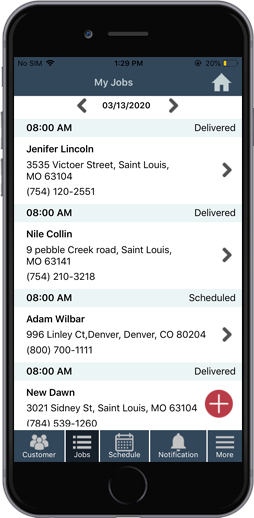
Review schedules, assign work, manage capacity and keep field teams moving as the day changes.
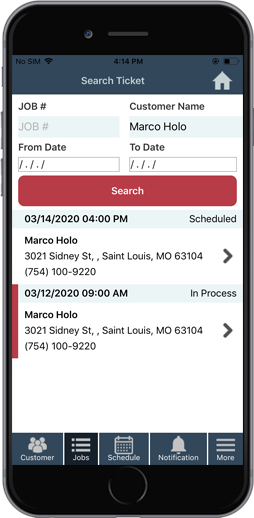
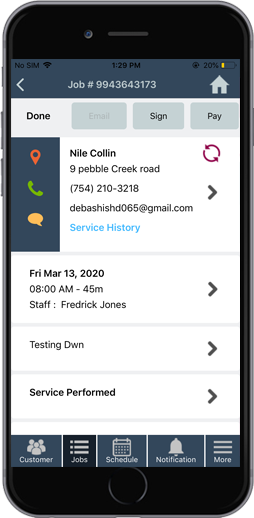
Create, update and track jobs with visibility into status, assigned technician, notes and service history.
Search inventory, manage parts, track items and keep material activity connected to the job.
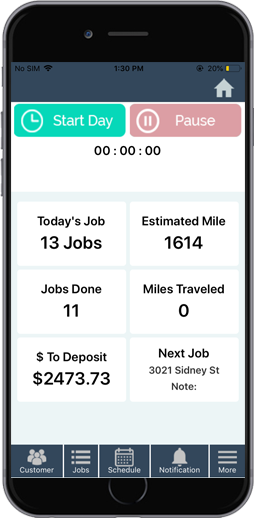
Keep technicians informed about their day and give the operation visibility as jobs progress.
Capture signatures, notes and field documentation so important job information stays with the ticket.
Help technicians complete the service lifecycle by collecting payment from the field.
For technicians
SWOpsCenter gives technicians direct access to the job information and actions they need throughout the day—without waiting for the office to relay every update.
Operations at a glance
For managers & dispatchers
SWOpsCenter helps managers monitor service activity, keep schedules moving and stay closer to field performance from a phone or tablet.
See what is happening across jobs, technicians and parts activity.
Monitor KPIs and time-efficiency signals while you are on the move.
Keep visibility into operations across locations from one app.
Stay close to the information needed to adjust the day quickly.
Inside SWOpsCenter
Use SWOpsCenter on phones and tablets to keep ServiceWorks workflows close to the people doing the work.
Made for field service
Keep jobs, technicians, parts and service history connected in the field.
Manage field activity, schedules and customer work while technicians are on the road.
Give mobile crews the job information and tools needed to complete service work.
Support mobile teams across repair, installation and maintenance workflows.
Ready to go mobile?
Download SWOpsCenter today from the App Store or Google Play.
See SWOpsCenter in Action
See how SWOpsCenter helps field teams stay connected to jobs, customer information, parts, status updates, documentation, invoicing and payments from the field.